
Thursday, October 18, 2012
GTrack Mentioned on 5by5 Podcast
GTrack App was mentioned on episode 20 of 5by5's In Beta podcast. I would like to thank the hosts of the show, and especially Gina Tripani, for their advice and encouragement. They also gave a really nice mention to the Wheel's of Love ride. To hear the episode, click here.


GTrack Lite Released
In order to raise awareness for the ride and my fundraising activity, I have just launched a free version of GTrack, called GTrack Lite.

The app is similar to GTrack, but has the following differences:

The app is similar to GTrack, but has the following differences:
- I've disabled auto logging and its related settings.
- You cannot add descriptions to recorded locations.
- I've added some new buttons to improve navigating between screens.
- Since it's a free app, I've added a Donate button. This button opens the About screen and contains all the relevant links.
You can download the app from the Google Play store.
Friday, October 12, 2012
Profile Picture
Finally, I put my profile picture on the site. I will soon add updated pictures of me in an ALYN shirt.
Google Merchant Account Verified
Google has finally verified my Google Checkout merchant account. This means that I will able to receive payments for the sales of GTrack, and donate the proceeds to the ALYN hospital.
Thursday, October 11, 2012
Now Available for Download
After a slight delay, I have now verified that the app can be downloaded an installed from Google Play. I can also say that it runs really well on a Samsung Galaxy S2. My thanks to Ezra Olman for testing that everything works.
Tuesday, October 9, 2012
GTrack 1.0 Available from the Google Play Store
I am very proud to announce that GTrack 1.0 is now available for download from the Google Play store. The app is priced at $1.00 and all proceeds will be donated to the children of the ALYN hospital. Please spread the word.
Using GTrack
Location Logging
GTrack records your position and adds a marker to a Google maps page. Clicking the + button records your current position. Clicking the Start button, lets you automatically record locations at set intervals. By default, GTrack records locations every ten minutes. You can change the length of the interval to meet your needs. GTrack records the time and date the location was logged, its longitude and latitdue, place name, and country.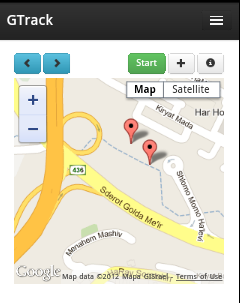
Location Information
To visit each logged location, click the Next (<) and Previous (>) buttons. GTrack will display the location's marker in the center of the map.To display location information, click a marker. This displays the location data for the marker.

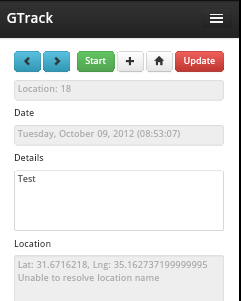
To find out more about a location, click the i (information) button. This displays the locations information page. The information page also provides a Details box. This lets you add additional information regarding each location.
Changing Settings
To change GTrack settings, click the  (Menu) button.
(Menu) button.
From the toolbar, choose Settings.

You can set the following options:

Subscribe to:
Posts (Atom)